
How do I cancel my Importify subscription?
Cancel Importify from the billing area for the platform where you subscribed. Shopify and Wix cancellations run through their platform billing, while WooCommerce, BigCommerce, and Jumpseller billing is handled by PayPro Global.
Before canceling, check where the subscription was created. The cancellation path depends on the store platform, so using the wrong billing area can make it look like the subscription is missing.
Cancellation Process by Platform
For Shopify users
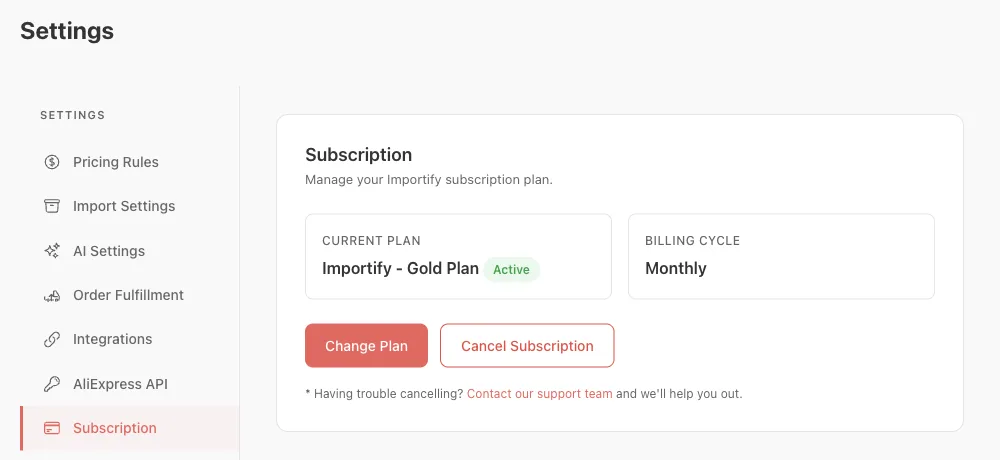
- In your Importify dashboard, go to Settings > Subscription.
- Click Cancel Subscription, then Yes, Cancel. Your access ends right away.
- You can also uninstall the app: in Shopify admin, go to Settings > Apps, find Importify and choose Uninstall.
For Wix users
Wix manages app subscriptions, so you cancel in your Wix account. Cancel Subscription in Importify's Settings > Subscription opens your Wix billing page.
- Log in to your Wix store's admin panel
- Navigate to "Subscriptions" in your Wix account
- Find Importify and click the "More Actions" icon next to it
- Select "Cancel App"
- Choose "Cancel auto renew" and click "Submit"
For WooCommerce, BigCommerce and Jumpseller users
These plans are billed through PayPro Global.
- Open your Importify dashboard.
- Go to Settings > Subscription and click Cancel Subscription.
- Click Yes, Cancel.
Your plan stays active until the end of your current billing period and does not renew.
Important Notes
On Shopify, cancelling ends your access right away. On WooCommerce, BigCommerce and Jumpseller, your plan stays active until the end of the billing period. On Wix, Wix's billing rules apply.
Need Help?
If you encounter any issues during the cancellation process, you can contact Importify support at supportimportify.com for assistance.