
How does Importify manage currency conversion when importing from international suppliers?
Importify detects the supplier page's currency and converts the cost to your store's currency before your pricing rules run. On every plan, with Undo.
On this page
Importify's automatic currency conversion reads the currency a supplier page shows, compares it with your store's currency, and converts the product cost before your pricing rules run. It's included on every plan, and you can undo it on any product.
Importify's built-in currency conversion
When you click Add on a supplier page, Importify checks which currency the page shows. If it's different from your store's currency, Importify converts the supplier cost at today's exchange rate, then applies your markup, compare-at markup and price ending. You see the result, and the math, before you add the product.
It works the same on Basic, Premium and Gold.
How it works when you import a product
Open the product and click Add. Importify reads the page currency, for example Thai baht on a Banggood page opened from Thailand.
Check the line under Product cost. If your store sells in US dollars, the cost converts automatically and the line shows the supplier's price, for example "Converted from ฿240.71 · Undo". Hover it to see the exchange rate.
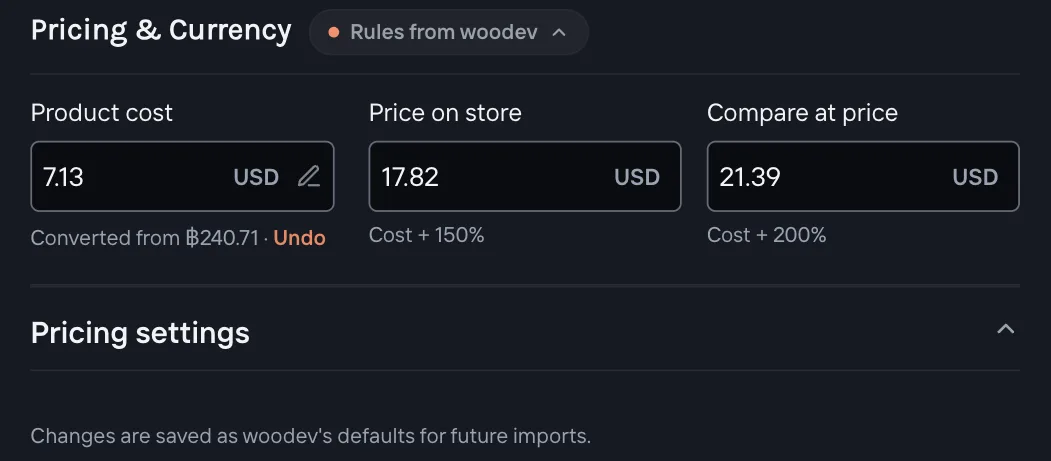
Review your prices. Price on Store and Compare at price are worked out from the converted cost, so your margin stays the same in your store's currency.
Undo if you want the page prices. Click Undo under Product cost to import the supplier's prices as they are. The line then reads "Prices in Thai baht · Convert to USD", so you can convert again. After your first Undo on a store, the link reads Turn off instead. It undoes the conversion and sets Currency conversion to Off. The panel then says "Conversion turned off. Turn it on in Settings."
Click Add to store.
If your store doesn't sell in US dollars
The page shows US dollars: Importify asks first. The notice says "Your store sells in" your currency, with Convert to your currency and Don't ask again.
The page and your store both use other currencies: Importify converts straight from one to the other, for example baht to euros, and shows Undo.
Choose Automatic, Ask first or Off
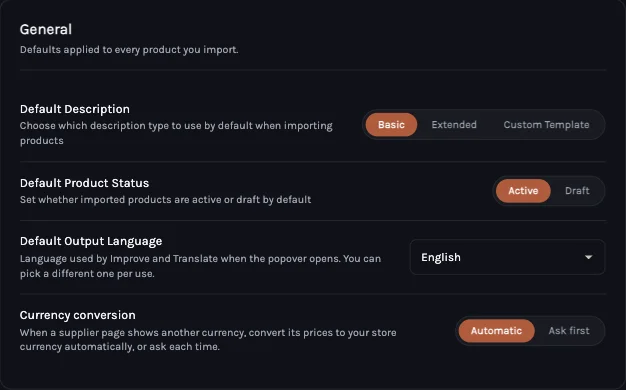
Open the panel's Settings tab, then General. Under Currency conversion, pick Automatic (the default), Ask first or Off. With Ask first, nothing changes until you click Convert to USD (or Convert to your store's currency) in the notice, which shows what the price would be.
With Off, Importify never converts. Products import with the supplier's prices as they are. When the page currency is different from your store's, the line under Product cost turns amber, for example "Prices in Thai baht · Convert to USD". Click Convert to USD to convert just that product. Check your prices before you publish: a ฿240 cost imports as 240 in your store's currency.
Check your store currency
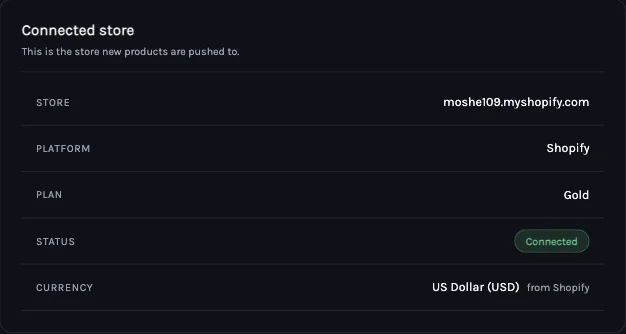
Importify converts to the currency your store sells in. To see it, open Settings, then Store, and look at Currency. Importify reads it from your store, for example "US Dollar (USD) from Shopify". If it can't, pick it from Choose your store currency.
Which supplier sites are detected
Importify detects the page currency on AliExpress, Amazon, Alibaba, Etsy, Shein, Temu, Taobao, Tmall, 1688, Lazada, Shopee, Flipkart, Snapdeal, Costco Canada and UK, LightInTheBox, MiniInTheBox, Banggood, Emmacloth, DHgate, Walmart Canada and JD.com. It converts only when the currency also shows on the page. Exchange rates update daily.
Pricing multipliers after conversion
Your pricing rules always run on the converted cost. A 150% store price markup on a $46.39 cost gives $69.01 with a .01 price ending, in your store's currency. Set your markup, compare-at markup and price ending once in the panel's Pricing settings (under Pricing & Currency) or in your dashboard's Settings > Pricing Rules.
Set the currency yourself
For a site Importify doesn't detect, open Pricing settings in the panel's Pricing & Currency section and pick the supplier's currency under Supplier currency. Exchange rate (1 USD =) fills in with today's rate, and you can change it.
If something looks wrong
| What you see | What to do |
|---|---|
| No "Converted from" line, and the cost looks like a foreign price | The site isn't detected or the currency doesn't show on the page. Pick it under Supplier currency in Pricing settings. |
| Prices look far too high or too low | Check Settings > Store > Currency. If it's wrong, choose your store currency there. |
| You wanted the supplier's own prices | Click Undo under Product cost, or set Currency conversion to Ask first or Off. |
| The cost shows the supplier's number, like 240 for a ฿240 product | Currency conversion is set to Off. Click Convert to USD under Product cost for this product, or pick Automatic in Settings > General. |
Frequently asked questions
Which plans include currency conversion?
Every plan: Basic, Premium and Gold. Conversion, Undo, the exchange rate and the settings work the same on each.
How often are exchange rates updated?
Daily. Always check the converted price before you add the product.
Can I turn automatic conversion off?
Yes. In the panel's Settings > General, set Currency conversion to Ask first.
Does currency conversion change my store's currency?
No. It converts the product cost Importify uses. Your store keeps selling in its own currency.