
How to import products from LtdCommodities to WooCommerce
Connect Importify to WooCommerce, open a LtdCommodities product page in desktop Chrome, use the Importify extension, review the listing, then import it to WooCommerce.
On this page
Imported LtdCommodities listings usually need cleanup before they belong in your WooCommerce store. Use the supplier page as a starting point, then check variants, images, pricing, shipping details, and customer-facing copy before you publish.
Before you start
Make sure your WooCommerce store is connected to Importify.
Use a desktop or laptop with Chrome. The browser extension workflow does not work the same way on mobile or tablet.
Install and enable the Importify Chrome extension.
Open a direct LtdCommodities product page. Search pages, category pages, carts, and home pages are not product pages.
Import a LtdCommodities product to WooCommerce
Log in to your Importify dashboard and confirm the correct WooCommerce store is selected.
Open LtdCommodities in Chrome.
Find the product you want to sell and open the product page.
Click the Importify Add button on the product page.

Wait for Importify to load the product details.
Review the product title, description, images, variants, price, tags, vendor, and product type.
Remove supplier text you do not want customers to see, delete weak images, and adjust pricing before import.
Under Product Status, choose Active, or Draft to keep it hidden until you publish it.
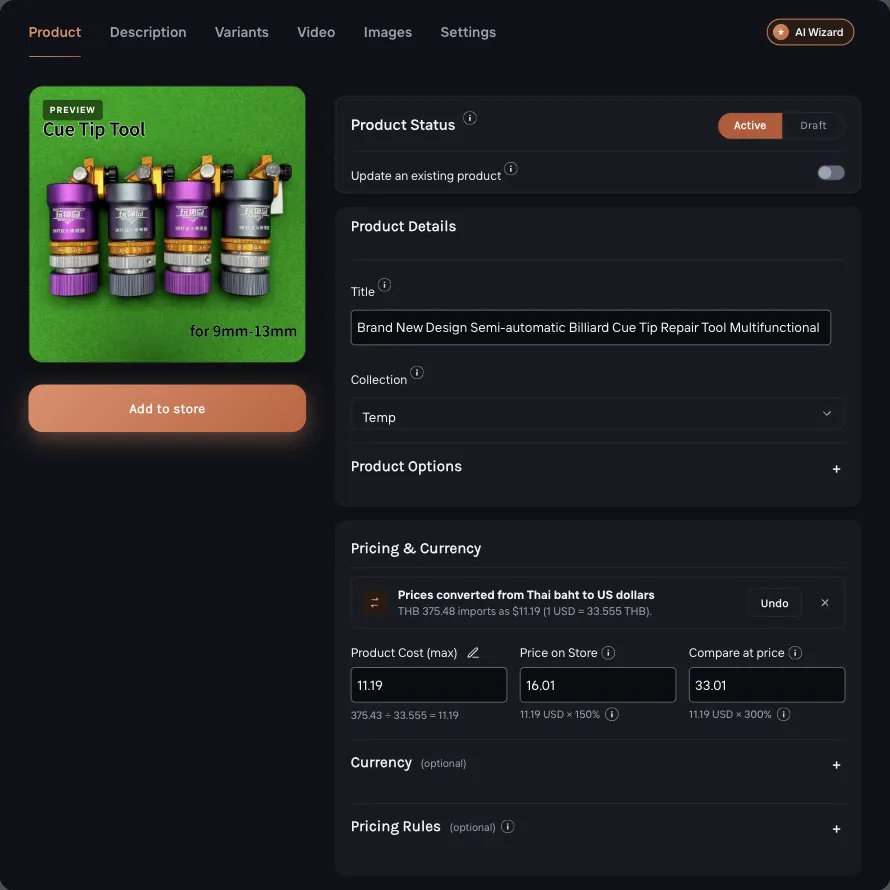
Click Add to store to add the product to WooCommerce.
Open WooCommerce and confirm the product appears in your products list.
What to check before publishing
Product title: make it clear and store-ready, not copied straight from the supplier page.
Description: remove supplier boilerplate, shipping claims you cannot guarantee, and formatting that does not fit your store.
Images: keep the images that help shoppers understand the product and remove duplicates.
Variants: check sizes, colors, SKUs, and unavailable variants before publishing.
Pricing: confirm your margin and any pricing rules before the product goes live. Importify imports one price for all variants. Set different prices in the Variants tab if sizes cost more.
If the import does not work
| Issue | What to check |
|---|---|
| The Importify button does not appear | Confirm the Chrome extension is installed and enabled, then refresh the LtdCommodities product page. |
| The product does not load | Make sure you are on a direct product page, not a category, search, cart, or home page. |
| The wrong store is selected | Return to Importify and confirm the connected WooCommerce store before importing again. |
| Product data looks incomplete | Reload the supplier page, try the import again, and manually clean up missing details before publishing. |
| The product imports but is not visible | Open WooCommerce, check product status, sales channel visibility, stock, and variant availability. |
After the product is imported
Do one final pass in WooCommerce. Confirm the product status, collection or category, price, variants, images, and shipping settings. Importify helps move the listing over, but you still control what shoppers see on your storefront.
Frequently asked questions
Can I import LtdCommodities products to WooCommerce with Importify?
Yes. Open a direct LtdCommodities product page in desktop Chrome, use the Importify extension, review the listing, and import it to WooCommerce.
Do I need the Chrome extension?
For supplier-page imports, yes. Install and enable the Importify Chrome extension, then refresh the supplier product page before importing.
Can I edit the product before publishing?
Yes. Review and edit the title, description, images, variants, pricing, tags, vendor, and product type before the product goes live.
What should I do if the import fails?
Confirm you are on a direct product page, check that the extension is enabled, refresh the page, and retry. If it still fails, contact Importify support with the product URL and a screenshot.