
How to import reviews to your Shopify product page
Use Editorify with Importify to choose a Shopify product, open the original supplier page, select the reviews you want, and import them to the product page.
On this page
Reviews work best when they match the exact product shoppers are viewing. Use this workflow after the Shopify product already exists, then import only the reviews that are relevant to that listing.
Before you start
Install the Editorify app for Shopify.
Install and enable the Editorify Chrome extension.
In Importify, open Settings > Integrations and install Editorify there. The Editorify icon appears in your Import List only after this.
Make sure the product already exists in Shopify.
Use the same supplier product page the product was imported from when possible.
Check the supplier. The Editorify icon shows only for products imported from supported suppliers, including AliExpress, Alibaba, Etsy, DHgate, Banggood, Walmart, 1688 and Taobao.
Import reviews to a Shopify product
Open the Importify dashboard.
Go to Import List.
Find the product you want to add reviews to.
Click the Editorify icon next to that product.
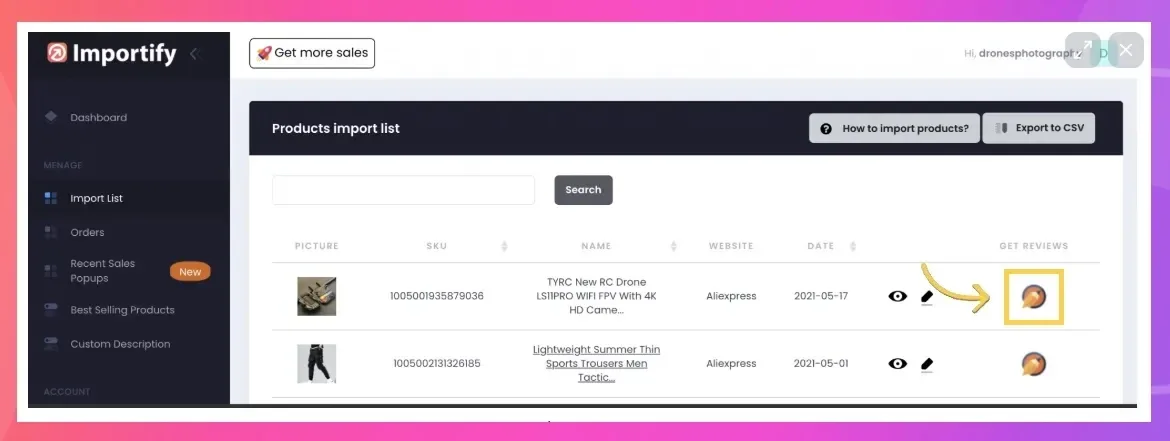
Importify opens the supplier product page connected to that product.
Use Editorify to select the reviews you want to import.
Choose the Shopify product that should receive the reviews.
Click Import now.
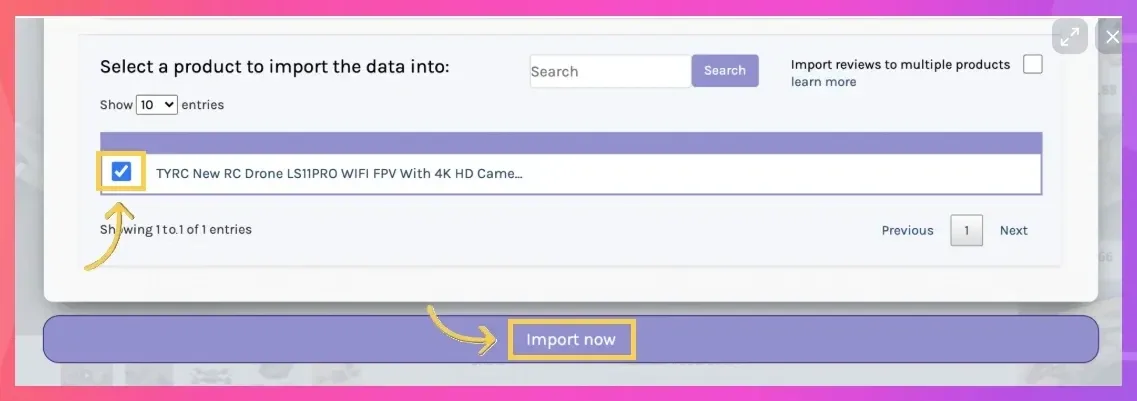
Open the Shopify product page and confirm the reviews appear where you expect them.
Review quality checklist
Import reviews that clearly describe the same product.
Skip reviews that mention a different model, color, size, or supplier issue that does not apply.
Keep a natural mix of ratings instead of importing only perfect reviews.
Check the final product page on desktop and mobile.
If reviews do not import
| Issue | What to check |
|---|---|
| Editorify does not open | Confirm the Editorify app and Chrome extension are installed and active. |
| The wrong product opens | Open the supplier page manually and use Editorify from there. |
| Reviews import to the wrong product | Check the product selection inside Editorify before clicking Import now. |
| Reviews do not show on the storefront | Confirm the review widget or theme placement is active in Shopify. |
Frequently asked questions
Does Importify import reviews by itself?
Review importing uses Editorify. Importify helps you connect the product workflow, then Editorify handles selecting and importing the reviews.
Do I need the original supplier product page?
Yes. Editorify needs the supplier product page so you can select the reviews you want to import.
Should I import every review?
No. Import reviews that are relevant, readable, and useful for the product page. Avoid duplicate, unrelated, or low-quality reviews.
What if the reviews do not appear?
Confirm Editorify is installed, the extension is active, and the reviews were imported to the correct Shopify product.