
Which suppliers import a different price for each variant?
Importify imports a separate price per variant from AliExpress, Amazon, Etsy, Alibaba, Walmart, Shein, Lazada, Taobao and Tmall. Other suppliers import one price.
On this page
Importify imports a separate price for each variant from AliExpress, Amazon, Etsy, Alibaba, Walmart, Shein, Lazada, Taobao and Tmall. Other suppliers import one price for every variant. You can still give each variant its own price in the import window before you add the product.
Suppliers that import a price per variant
On these sites, Importify reads each variant's own supplier price and applies your pricing rules to it. A bigger size or a multi-pack gets a higher price in your store, just like on the supplier site.
| Supplier | Price per variant |
|---|---|
| AliExpress | Yes |
| Amazon (Premium and Gold) | Yes |
| Etsy | Yes |
| Alibaba | Yes |
| Walmart | Yes |
| Shein | Yes |
| Lazada | Yes |
| Taobao and Tmall | Yes |
| 1688, Temu, DHgate, CJdropshipping, Banggood, Shopee and the other supported suppliers | One price for all variants |
Why all my variants have the same price
If you import from a supplier that isn't on the list above, every variant gets the same price. Importify uses one price from the supplier page for all of them. Check the variant prices before you add the product, especially when sizes or pack quantities cost different amounts on the supplier site.
Set a different price for each variant yourself
Open the product on the supplier site and click Add.
Open the Variants tab and choose Select Variants.
Type the price you want in each variant's Price box. Untick any variant you don't want to sell.
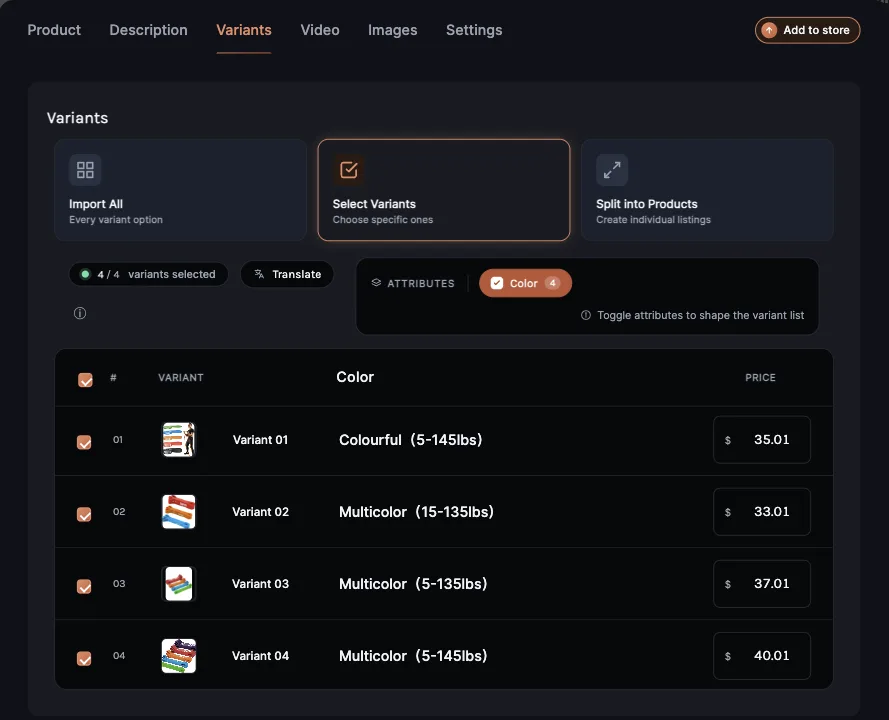
Click Add to store.
You can also change variant prices later in your store's product editor.
How your pricing rules apply
Your markup, compare-at markup and price ending run on each variant's cost. With a 150% markup, a variant that costs $10 sells for $15 and one that costs $20 sells for $30, before the price ending. Set the rules once in the panel's Pricing Rules or in your dashboard's Settings > Pricing Rules.
Related Guides And References
- How to customize pricing rules and default settings
- How to import products from Amazon
- Supported suppliers
Frequently asked questions
Why do all my variants have the same price?
The supplier isn't one that imports a price for each variant. Set each variant's price in the Variants tab before you add the product.
Can I change variant prices after import?
Yes. Edit them in your store's product editor.