
How can I access my billing history and invoices?
Open the billing area for the platform that manages your Importify subscription to view payment history and download invoices.
On this page
Accessing your billing history and invoices for Importify depends on the e-commerce platform you're using. Here's how to view this information for each supported platform:
For Shopify users:
- Log in to your Shopify admin dashboard
- Go to "Settings" > "Billing"
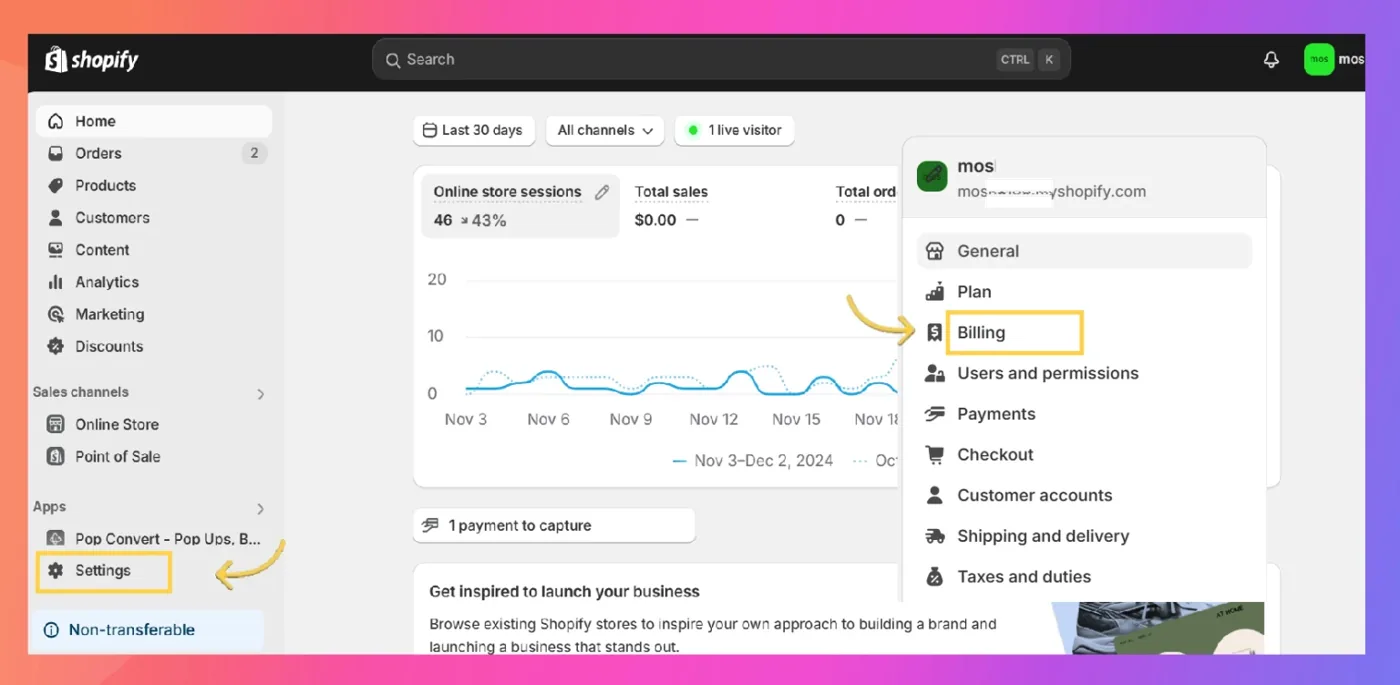
- Here you'll find your billing history and can download invoices for Importify charges
For Wix users:
- Log in to your Wix account
- Navigate to "Billing & Payments" in your dashboard
- Select "Payment History" to view all transactions
- Click on specific Importify charges to view or download invoices
For WooCommerce, BigCommerce and Jumpseller users:
- Log in to your PayPro Global account at https://cc.payproglobal.com/Customer/Account/Login
- Go to the "Orders" section
- Here you can view your transaction history and download invoices for Importify subscriptions
If you can't find your billing information or need help accessing your invoices, you can:
- Check your email for payment receipts sent when your subscription renews
- Contact Importify support at supportimportify.com for assistance in retrieving your billing history or specific invoices
Remember to keep your invoices for your records, as they may be needed for accounting or tax purposes.
Note: The exact steps might vary slightly based on updates to the respective platforms' interfaces. If you have trouble locating your billing information, refer to the latest guidance in your platform's help center or contact their support team.