
How to Delete a Location on Shopify
Deactivate the Shopify location, move or clear any inventory assigned to it, then delete it only after Shopify no longer shows active stock, orders, or app dependencies.
On this page
Use this cleanup only when a Shopify location is no longer needed. Before deleting it, make sure it is not the default location and that inventory, app settings, and open order workflows no longer depend on it.
This is a Shopify store setting, not an Importify setting. Importify can import products into your Shopify store, but Shopify controls store locations, inventory locations, pickup locations, and fulfillment settings.
Before You Delete A Shopify Location
Check these items before deleting a location:
Default location: if this is your default location, set another location as default first.
Inventory: transfer, adjust, or remove inventory assigned to the location.
Fulfillment rules: check whether orders, shipping profiles, or fulfillment workflows use the location.
Local pickup: disable pickup options tied to the location if you use them.
Apps: check whether any Shopify apps depend on that location for inventory or fulfillment.
Deleting a location is permanent. If you only need to pause a warehouse, office, store, or pickup point, deactivating the location may be enough.
How To Delete A Location On Shopify
Log in to your Shopify admin.
Go to Settings.
Click Locations.
Select the location you want to remove.
Click Deactivate location and confirm.
After the location is deactivated, click Delete location.
Confirm the deletion.
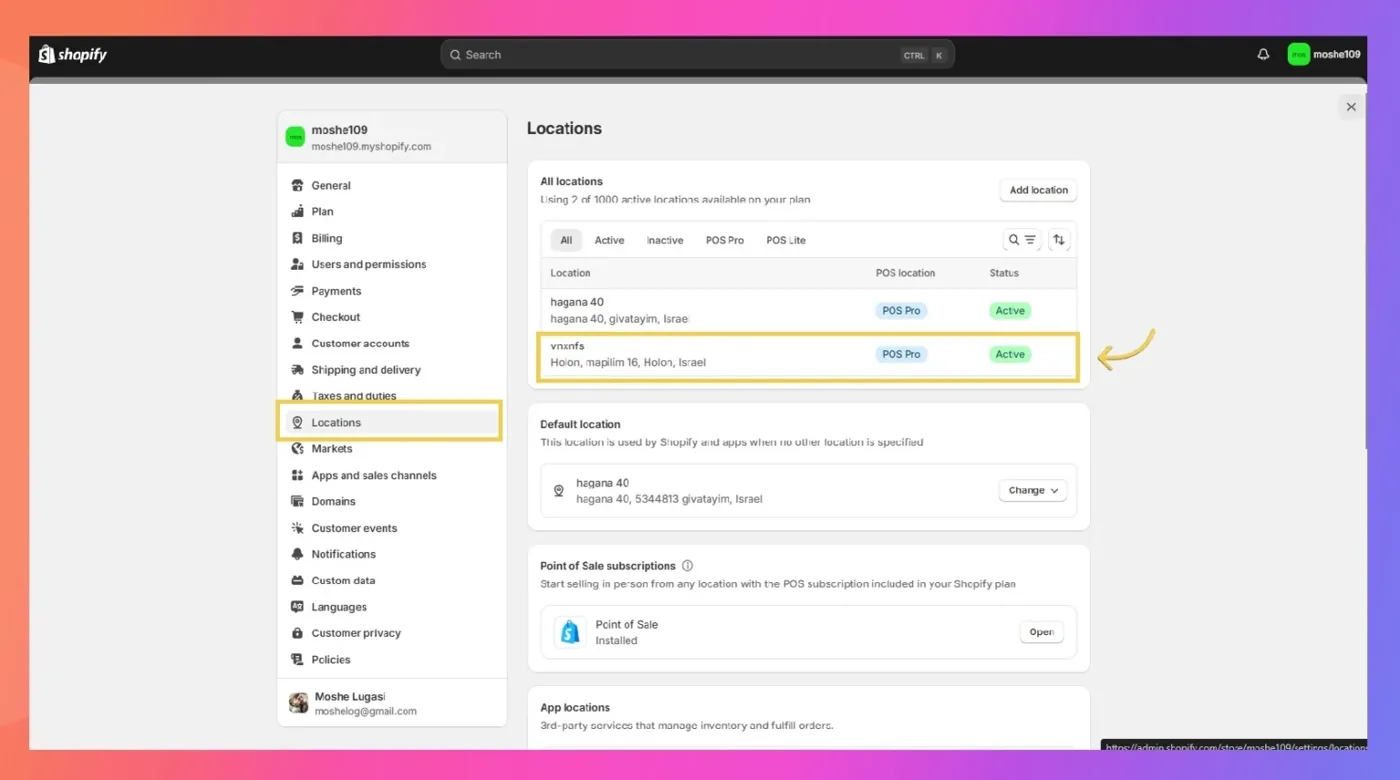
If you do not see the delete option, the location may still be active, may still be your default location, or may still have Shopify requirements that must be resolved first.
Why Shopify May Block Location Deletion
Shopify may prevent deletion when the location is still connected to store operations. Common reasons include:
The location is still active.
The location is still the default location.
Inventory is still assigned to the location.
The location is connected to local pickup.
The location is used by a fulfillment service, shipping setup, or app workflow.
Resolve the blocker, refresh Shopify admin, then check the location settings again.
What Happens After You Delete A Shopify Location
After deletion, the location can no longer be used for new inventory, local pickup, or fulfillment workflows. Shopify may still keep historical reporting data for past orders, but the location itself cannot be restored.
If you import products with Importify after deleting a location, review the product inventory settings in Shopify and confirm that new products are assigned to the correct active location.
When To Contact Shopify Support
Contact Shopify support if the location cannot be deleted after you deactivate it, change the default location, and clear inventory or pickup settings. Shopify controls this setting, so Shopify support is the right team for account-specific blockers.
You can also review Shopify's official location documentation here: Shopify location setup documentation.