
Why aren't my collections showing in Importify extension?
If Shopify collections do not appear in the Importify extension, refresh the connection, confirm the collections exist in Shopify, and retry the import workflow.
If you're having trouble seeing your collections in the Importify extension, especially on Shopify, here's a quick guide to resolve the issue:
Understanding the Problem
The problem occurs when collections are set to automatically include products.
The Quick Fix for Shopify Users
- When creating a new collection, always choose "manually select products".
- This setting ensures the collection will be visible in the Importify extension.
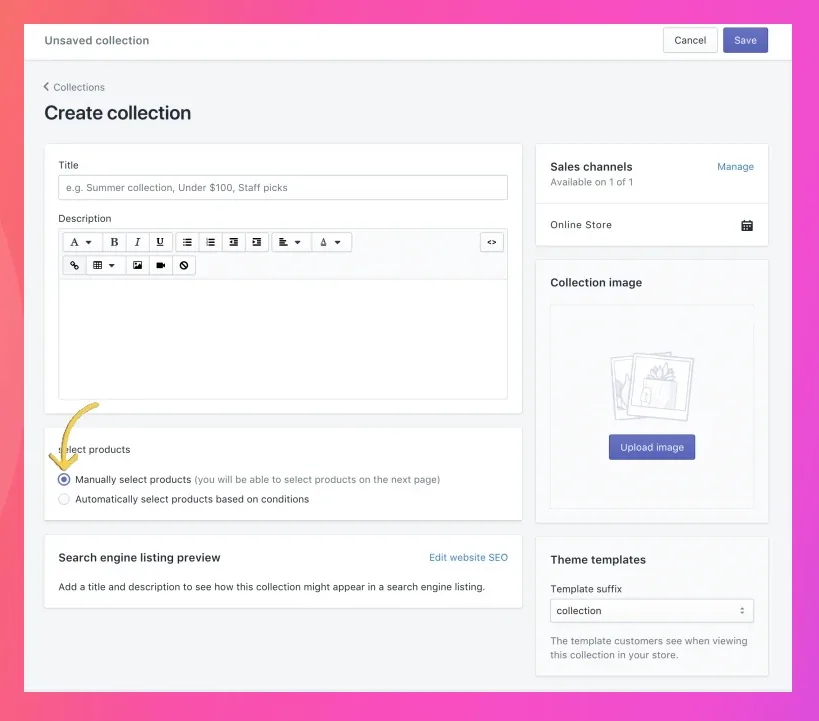
Steps to Create a Compatible Collection
a. Go to your Shopify admin
b. Navigate to Products > Collections
c. Click "Add collection"
d. Under "Products selection", choose "Manually select products"
e. Complete the collection setup as usual
For Existing Collections
- Edit the collection
- Change the product selection method to "manual"
- Save your changes
Using Collections in Importify
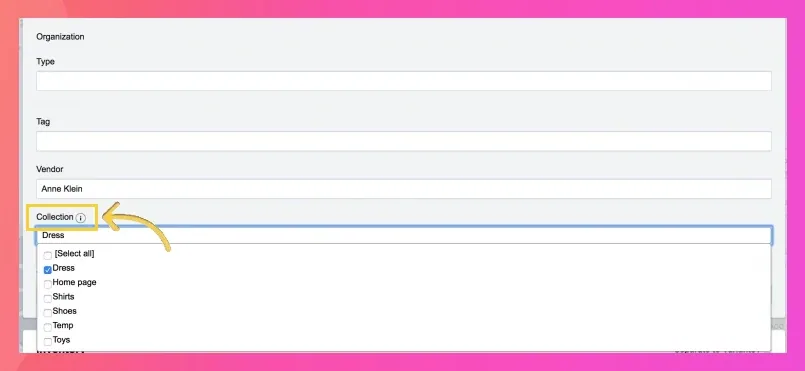
See where collections should appear in the import editor: opening the Collection field and viewing your store's collections.
- After setting up collections correctly, they should appear in the Importify extension
- When importing a product, you'll see these collections in the "Collection" dropdown.
Troubleshooting
- If collections still don't appear, try refreshing the Importify extension
- Ensure you've saved all changes in your Shopify admin
Remember, this setting is crucial for Shopify users. For other platforms, collections should appear automatically, but contact Importify support if you experience issues.
By following these steps, you'll ensure all your collections are visible and ready for use when importing products with Importify.