
Getting started with Importify on Shopify
Install Importify from the Shopify App Store, approve permissions, choose a plan through Shopify billing, import one product, and review it before scaling.
On this page
Install Importify from the Shopify App Store
Open the Shopify App Store listing for Importify and install the app on the store you want to use. Shopify asks you to approve the app permissions before the connection is created.
After approval, Shopify opens Importify with your store already connected. You do not need a separate Importify signup.
Choose your Shopify plan
Pick the plan based on your supplier and workflow. Basic starts at $14.95/month, Premium starts at $27.95/month and adds Amazon plus AI features, and Gold starts at $37.95/month and adds AliExpress order fulfillment.
Shopify handles billing for Shopify stores. You get a 1-day free trial on every Importify plan, and the exact charge timing appears during checkout.
Import a product to Shopify
See Product Finder in action: describing a product in plain language and reviewing the ranked matches.
Start with one product. That gives you time to check the listing, price, images, variants, and shipping before you publish more.
Open Importify from your Shopify admin.
Use Product Finder, or open a supported supplier page in Chrome or Edge and click the Importify Add button.
Edit the product title, description, images, variants, tags, vendor, product type, and prices in the Importify window.
Choose draft if you want to review the product in Shopify first.
Click Add to store to send the product to Shopify.
Set Shopify pricing and collections
Set your pricing rules before importing a batch. Importify applies your markup (a multiplier, a fixed percentage or a fixed amount), a compare-at markup and your price ending, so each product lands with the right price.
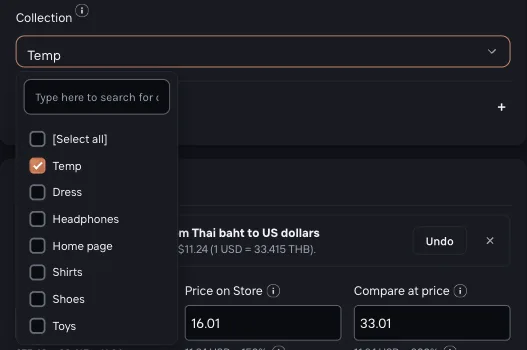
Pick the collection in the import window. For AliExpress products, Importify can also match the supplier's category to your store's categories (Settings > Import Settings). Clean this up early, because it affects navigation, product filters, and ads later.
Fulfill your first Shopify order
Open Importify Orders when a customer buys an imported product. For AliExpress products on the Gold plan, Importify can prepare checkout by selecting the item and variant, filling customer shipping details, and opening AliExpress checkout for your review and payment.
Honest note: full auto-ordering is AliExpress-only. Products from other suppliers can still be managed through Importify, but you may place the supplier order manually.
Next steps
Frequently asked questions
Can I use Importify on Shopify?
Yes. Importify supports Shopify, along with Shopify, Wix, WooCommerce, BigCommerce, and Jumpseller.
How is Importify billed on Shopify?
Shopify handles billing for Shopify stores, and Importify offers a 1-day free trial on every plan.
Which plan should I start with on Shopify?
Basic is enough for testing most suppliers. Choose Premium if you need Amazon or AI features, and choose Gold if you need AliExpress order fulfillment.
Does Importify automate every Shopify supplier order?
No. Full order automation is AliExpress-only. For other suppliers, Importify keeps the product and order workflow organized, but you may place the supplier order manually.