
How to Choose Ecommerce Products That Actually Sell
Use this product selection checklist to compare demand, margins, supplier quality, shipping risk, and listing potential before you import products.
On this page
- Short answer
- Start With The Product Selection Checklist
- Step 1: Check Demand Before You Import
- Step 2: Choose Products With Real Margins
- Step 3: Review Supplier Quality
- Step 4: Avoid High-Risk Product Types
- Step 5: Score Each Product Before Publishing
- Step 6: Import And Improve The Product Listing
- Step 7: Test With A Small Product Batch
- Best Product Categories To Test
- Product Selection Mistakes To Avoid
- Related Guides And References
- FAQ
Choosing ecommerce products is not about finding the item with the biggest order count. The products worth testing have clear demand, realistic margins, reliable supplier options, and a customer problem you can explain quickly. A weak product creates slow sales, refund requests, pricing pressure, and support work.
This product selection guide gives you a practical checklist and scoring process. Use it before you import products with Importify from AliExpress, Alibaba, Amazon, Etsy, Shein, Temu, CJdropshipping, 1688, and other supported marketplaces.
Start With The Product Selection Checklist
Before spending time editing titles, images, or descriptions, check whether the product deserves a place in your store. A strong ecommerce product usually meets most of these criteria:
Clear demand: shoppers are already buying or searching for this type of product.
Specific use case: the product solves a problem, saves time, improves comfort, or supports a hobby.
Healthy margin: the final selling price can cover product cost, shipping, payment fees, ads, returns, and profit.
Reliable supplier: the supplier has enough reviews, clear photos, consistent variants, and reasonable shipping options.
Low support risk: the product is not fragile, confusing, oversized, restricted, or likely to cause sizing issues.
Room to differentiate: you can improve the title, images, description, bundle, offer, or audience positioning.
If a product fails on demand, margin, or supplier reliability, do not force it. There are always more products to test.
Step 1: Check Demand Before You Import
Demand is the first filter. You do not need perfect data, but you need enough proof that people already want the product.
Marketplace demand signals
When reviewing products on supplier marketplaces, look for:
Order volume or sales history
Recent reviews, not only old reviews
Multiple suppliers selling similar products
Product variants that make sense, such as color, size, bundle, or material
Photos from real customers, when available
A product with many old orders but no recent reviews may be declining. A newer product with fewer orders can still be worth testing if reviews are fresh, social interest is growing, and the product solves a clear problem.
Search and content demand signals
Use search behavior to understand what shoppers want to know before buying. Look for queries around:
Best product for a specific problem
Product alternatives or comparisons
How to use the product
Product compatibility, sizing, materials, or safety
Gift ideas, niche accessories, or seasonal needs
These queries can later become product descriptions, FAQs, ads, blog posts, or collection pages. If you cannot explain why someone would search for the product, it may be hard to sell.
Step 2: Choose Products With Real Margins
A product is not a winner just because it sells. It also needs enough margin after the real costs are included.
Calculate margin using the full landed cost:
Supplier product cost
Shipping cost
Payment processing fees
Expected ad cost or marketplace fees
Discounts, refunds, replacements, and support time
Example:
Product cost: $5
Shipping: $2
Payment and handling estimate: $1
Total cost before marketing: $8
Possible retail price: $24 to $32
This gives you room to test paid traffic, offer discounts, and still keep a profit. If the only way to sell the item is to match the cheapest competitor, skip it.
Importify checks this when you import. It warns you if a product would sell below its cost, and blocks the import if the price would be $0.00.
Step 3: Review Supplier Quality
Supplier quality affects customer satisfaction more than most beginners expect. A supplier with weak photos, vague descriptions, inconsistent variants, or slow processing can damage an otherwise good product idea.
Check these supplier signals before importing:
Average product rating, ideally 4.5 stars or higher
Review count and recent review quality
Clear variant names and matching images
Shipping options to your main customer countries
Realistic delivery estimates
Consistent product photos and specifications
Supplier response quality, when messages are needed
For Taobao, Tmall, and 1688, you need to be logged in to the marketplace account before importing because these marketplaces can hide product listing data until your session is active. Log in first, then use Importify to import the product.
Step 4: Avoid High-Risk Product Types
Some products look attractive but create operational risk. Be careful with:
Fragile items that break during shipping
Oversized or heavy products with expensive delivery
Products with complex sizing, especially clothing and shoes
Medical, supplement, safety, or regulated products
Branded or copyrighted products without clear permission
Electronics with unclear safety certifications
Products that require detailed installation support
If you still want to test a higher-risk product, order a sample first and make the return policy, shipping estimate, and product limitations clear on your store.
Step 5: Score Each Product Before Publishing
A simple scoring system helps you compare products without relying on gut feeling.
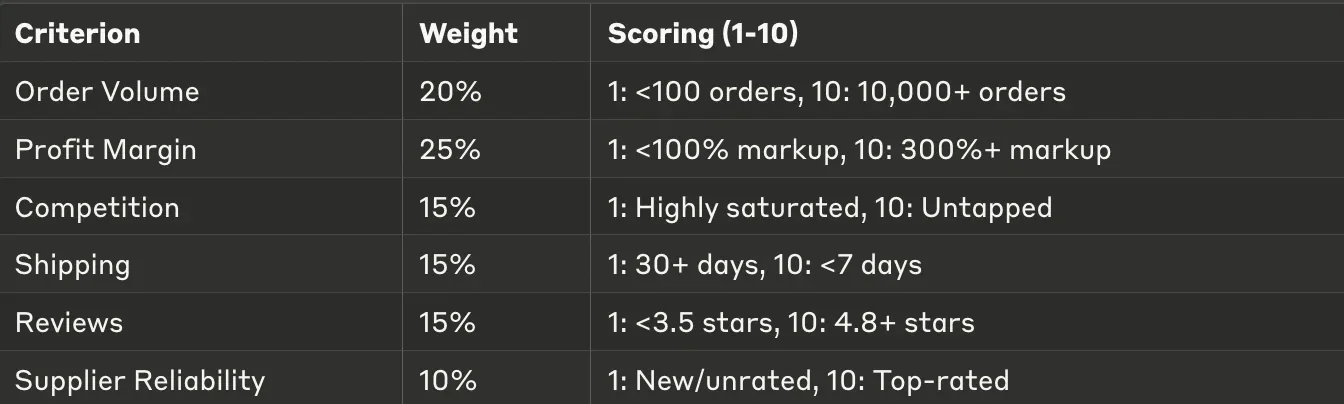
Use a 1 to 5 score for each factor:
Demand: Are people already buying or searching for this product?
Margin: Can you price it profitably after all costs?
Supplier reliability: Are ratings, reviews, variants, and shipping options strong?
Differentiation: Can you create a better listing, bundle, offer, or audience angle?
Risk: Is the product easy to ship, explain, and support?
Products with a total score of 20 or higher are usually worth testing. Products below 15 should usually be skipped unless you have a specific reason to test them.
Step 6: Import And Improve The Product Listing
Once a product passes your checklist, import it with Importify and improve the listing before publishing. Do not copy supplier content exactly as-is.
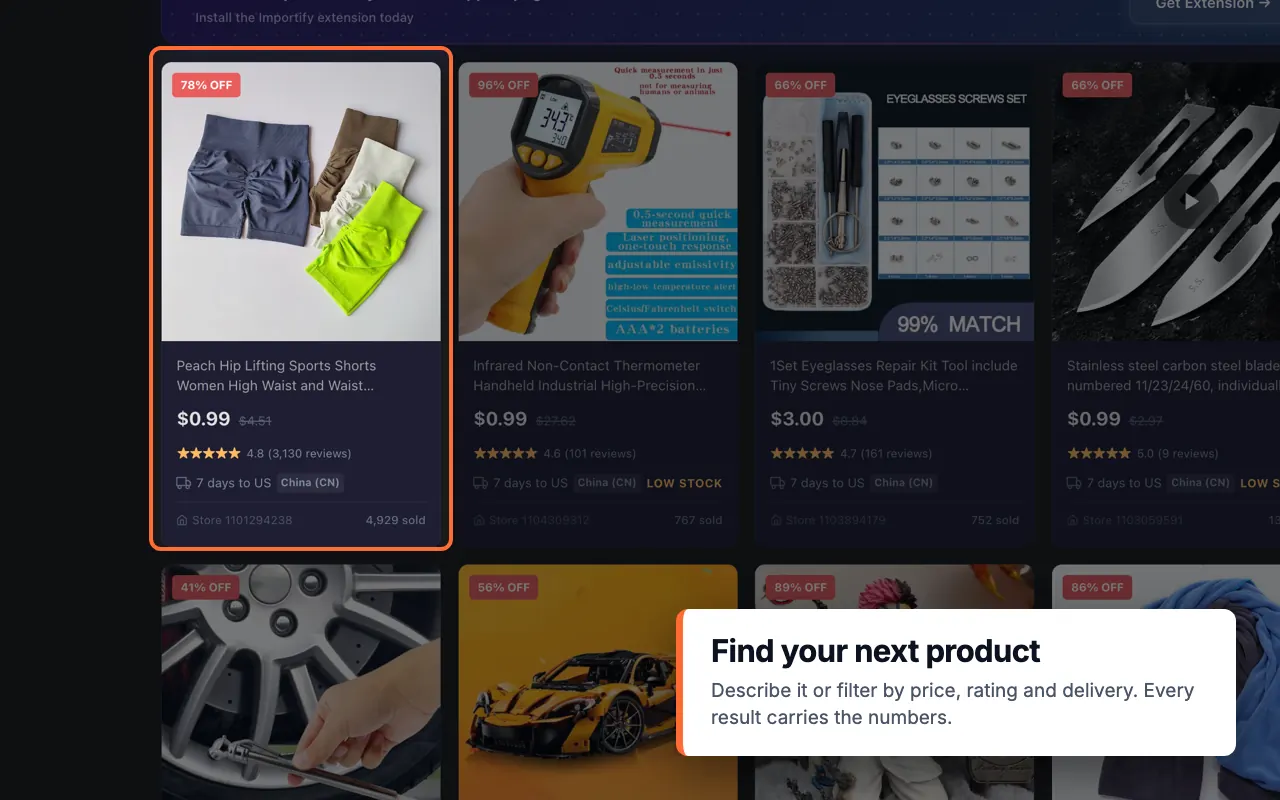
After importing, review:
Title: make it clear, searchable, and customer-focused.
Description: explain the use case, benefits, specifications, materials, and what is included.
Images: remove duplicates, low-quality images, confusing variant photos, or supplier branding.
Variants: keep only variants you are willing to support.
Pricing: apply your markup rule and check the final price manually.
Shipping: set realistic expectations on the product page.
Importify can help you import the product, edit the listing, apply pricing rules, and use AI tools to rewrite product titles and descriptions (Premium and Gold). The final decision should still be based on product quality, margin, supplier reliability, and customer fit.
Step 7: Test With A Small Product Batch
Do not build your whole store around one untested product. Start with a small group of products in the same niche, then compare performance.
Track:
Product page views
Add-to-cart rate
Conversion rate
Refund or complaint rate
Ad cost per sale
Profit after product, shipping, and marketing costs
Keep products that show demand and acceptable profit. Remove products that create support issues, poor margins, or weak conversion after a fair test.
Best Product Categories To Test
There is no universal best category, but these categories often work well because they have clear use cases and broad demand:
Home organization: storage, cleaning, kitchen, and space-saving products.
Pet accessories: comfort, safety, grooming, feeding, and travel products.
Beauty and personal care: tools, organizers, hair accessories, and skincare accessories.
Phone and tech accessories: cases, stands, charging accessories, and desk setup products.
Fitness and wellness: compact home fitness, recovery, and habit-support products.
Hobby products: accessories for passionate communities with repeat purchase potential.
Choose categories where you can understand the customer, write useful product pages, and test multiple related products.
Product Selection Mistakes To Avoid
Choosing only by order count: high demand can also mean high competition.
Ignoring shipping time: slow delivery can hurt reviews and repeat purchases.
Copying supplier descriptions: generic descriptions rarely convert well.
Keeping every variant: too many variants can create confusion and support work.
Skipping policy checks: avoid branded, restricted, unsafe, or unclear products.
Testing too many unrelated products: a focused niche is easier to market and optimize.
Related Guides And References
Google Trends, for checking search-interest direction before choosing a product category.