
How to Import Products From Banggood (Shopify, Wix, WooCommerce & More)
Open a Banggood product page, use the Importify import button, edit the listing, then add it to Shopify, Wix, WooCommerce, BigCommerce, or Jumpseller.
On this page
Treat the supplier page as raw product data, not finished storefront copy. Before publishing, check variants, images, pricing, shipping details, and the product description so the listing fits your store.
Banggood is a retail marketplace source, so product availability, warehouse options, shipping methods, prices, and delivery times can change by country and listing. Review the live Banggood product page before you import and again before you place a supplier order.
Before you start
Make sure you have an active Importify subscription and that Importify is installed on your store. Then install the Importify Product Importer Chrome extension. If you are not signed in when you click Add, Importify prompts you to log in.
Important: You do not need to sign in to Banggood to import products. You only need to sign in to Banggood when you fulfill an order.
Before importing, review the live Banggood product page, including the country setting, warehouse, product details, prices, variants, shipping options, and availability. The legacy Banggood flow used usa.banggood.com with the country set to USA because the extension button may not appear correctly on every Banggood region.
- Shopify: install Importify from the Shopify App Store, then see getting started with Importify on Shopify.
- Wix: install from the Wix App Market, then see how to install Importify on Wix.
- WooCommerce: set up Importify on WooCommerce.
- BigCommerce: getting started on BigCommerce.
- Jumpseller: getting started on Jumpseller.
Add a Banggood product and customize it
Open the Banggood product page you want to import and click the Importify Add button.
The Importify window opens with the product details. From there, you can edit the product before adding it to your store:
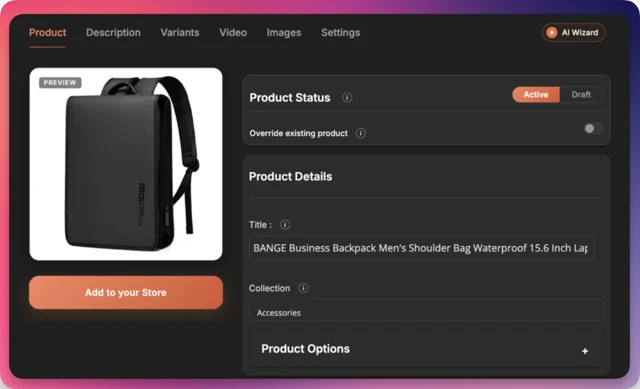
- Edit the essentials: title, description, images, variants, SKUs, tags, vendor, and product type.
- Rewrite the listing for shoppers: marketplace copy is often written for browsing Banggood, not your store. Use the AI Product Optimizer on Premium or Gold to create clearer retail copy.
- Set your price: use Smart Pricing Rules to apply your markup and price ending. Automated currency conversion is available on every plan.
- Split variants: Variant Splitting can turn one multi-variant listing into separate products.
- Assign collections: pick the collection in the import window. Importify remembers your last choice.
- Add product videos: if the supplier page includes a video, import it with the product video import workflow (Premium and Gold).
Add it to your store
When the product is ready, click Add to your store.
The product is published live by default. To import it as a draft, switch the toggle to Draft before importing.
After importing, the product is added to your store and also appears in your Importify import list. It will be published or saved as a draft, depending on the option you selected.
For Banggood, importing as a draft is usually safer. Check warehouse labels, shipping promises, product images, variant names, voltage or plug options, sizing, and any branded-product claims before publishing.
Fulfill Banggood orders
Banggood orders are fulfilled manually. When a customer places an order, sign in to Banggood, review the live product page, and place the supplier order yourself using your customer's shipping address.
Before paying, confirm the current price, selected variant, warehouse, shipping method, shipping cost, destination country, and delivery estimate.
Importify's automated order fulfillment is only available for AliExpress orders. If the live Banggood price, warehouse, or shipping estimate changed since import, update your store listing or choose a different product before fulfilling future orders.
Check the product before selling
Review the Banggood listing before building a product page around it:
- Check warehouse, destination-country support, processing time, shipping options, and delivery estimate.
- Confirm whether product variants affect size, color, plug type, voltage, bundle contents, or cost.
- Check whether the listed price changes by variant, country, coupon, warehouse, or shipping method.
- Avoid branded products unless you have clear permission to resell them. See dropshipping policies and supplier permissions
- Do not assume that importing a product means Banggood supports every dropshipping workflow or destination. Importify is a product-import tool, not the supplier or seller of record.
Watch the Banggood import video
Watch the full Banggood import flow: add the product, rewrite the listing with AI, review pricing and SEO, then add it to your store.
Related Guides And References
- Banggood
- Importify supported suppliers
- Importify Chrome extension guide
- Importify on Shopify App Store
- Variant Splitting guide
Frequently asked questions
Do I need to log in to Banggood before importing?
No. You do not need to sign in to Banggood before importing with the Importify Add button. You only need to sign in to Banggood when fulfilling an order. Before importing, review the live Banggood product page, including the country setting, warehouse, prices, variants, shipping options, and availability.
Can I import Banggood products to WooCommerce and Wix, not just Shopify?
Yes. Importify imports Banggood products to Shopify, Wix, WooCommerce, BigCommerce, and Jumpseller. The import and customization steps are the same on every supported store platform.
Does Importify fulfill Banggood orders automatically?
No. Banggood orders are fulfilled manually. Importify imports and prepares the product listing for your store, but you still need to review the live Banggood product page, place the supplier order, pay Banggood, and update tracking through your normal fulfillment process.
Importify's automated order fulfillment is only available for AliExpress orders.
What should I check before selling a Banggood product?
Check warehouse, shipping method, destination-country support, delivery estimate, variant details, plug or voltage options, current price, and whether the product is branded. Importing a product does not guarantee that the listing is suitable for every dropshipping workflow.