
How to Import Products From Alibaba (Shopify, Wix, WooCommerce & More)
Open an Alibaba product page, use the Importify import button, edit the listing, then add it to Shopify, Wix, WooCommerce, BigCommerce, or Jumpseller.
On this page
Alibaba is a wholesale marketplace, so review the supplier terms before treating a listing as a dropshipping product. Check minimum order quantities, shipping details, and product options before publishing.
Alibaba import is available on every Importify plan, with no import limits: import unlimited products on any plan and any platform. AI optimization (below) is on the Premium and Gold plans. Currency conversion works on every plan.
Is Alibaba right for your store? Wholesale vs dropshipping
Alibaba is a business-to-business, wholesale marketplace. Most suppliers sell in bulk with a minimum order quantity (MOQ), and the unit price drops the more you buy. That makes Alibaba the place to stock inventory, order private-label or branded products, and build a real brand, rather than ship one unit at a time.
You can import any Alibaba listing into your store with Importify, just plan around the supplier's MOQ and lead time. If you want single-unit, no-inventory dropshipping instead, AliExpress is usually the better fit: see how to import from AliExpress, or compare the two in Alibaba vs AliExpress.
Before you start
Make sure you have an active Importify subscription, Importify is installed on your store, and the Importify Chrome extension is installed in your browser. If you are not signed in when you import your first product, Importify prompts you to log in.
Important: You do not need to sign in to Alibaba to import products. You may need to sign in to Alibaba when you message suppliers, request samples, or place an order.
Before importing, review the live Alibaba product page, including product details, prices, variants, MOQ details, lead times, and supplier contact options.
- Shopify: install Importify from the Shopify App Store, then see getting started with Importify on Shopify.
- Wix: install from the Wix App Market, then see how to install Importify on Wix.
- WooCommerce: connect WooCommerce to Importify.
- BigCommerce: getting started on BigCommerce.
- Jumpseller: getting started on Jumpseller.
How to import Alibaba products with Importify
- Install the Importify Product Importer Chrome extension.
- Open the Alibaba product page you want to import.
- Click the Importify Add button on the Alibaba page.
- Edit the title, description, images, variants, tags, vendor, product type, and price in the Importify window.
- Choose whether to publish the product live or switch it to Draft before importing.
- Click Add to your store to send the Alibaba product to your connected store.
Before selling the product, check the Alibaba supplier's MOQ, sample options, lead time, shipping cost, and destination support. Alibaba is usually better for wholesale, private-label, and bulk sourcing than one-unit dropshipping, so confirm the supplier terms before you send traffic to the product page.
Add a product and customize it
On the Alibaba product page, click the Importify Add button.
The Importify window opens with the product details. From there, you can edit the product before adding it to your store:
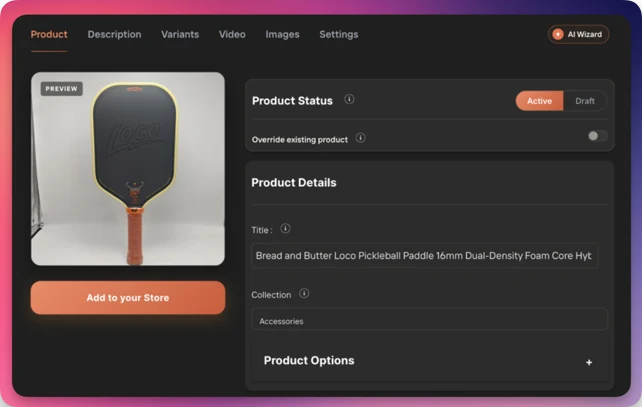
- Edit the essentials: title, description, images, variants, SKUs, tags, vendor, and product type. Alibaba listings are written for wholesale buyers, so this is worth doing.
- Optimize the copy with AI (Premium/Gold): the AI Product Optimizer rewrites the title and generates a full, benefit-driven description in your store's brand voice and tone, tuned to your target audience, so the listing reads like a retail page, not a wholesale spec sheet.
- Add a buyer FAQ and trust section (Premium/Gold): auto-generate product-page FAQs and trust-building content that answer common questions and reduce buyer hesitation.
- Set your price: Smart Pricing Rules apply your markup and price ending. On every plan, Automatic Currency Conversion converts the supplier's currency to your store's currency.
- Split variants: Variant Splitting turns one multi-variant listing into separate products.
- Assign collections: pick the collection in the import window. Importify remembers your last choice.
- Add product videos: import the supplier's product video (Premium and Gold). On Wix it appears in the product's media gallery.
- For product reviews, use the Editorify integration: see how to import reviews.
Add it to your store
When the product is ready, click Add to your store.
The product is published live by default. To import it as a draft, switch the toggle to Draft before importing.
After importing, the product is added to your store and also appears in your Importify import list. It will be published or saved as a draft, depending on the option you selected.
When you are ready to order
Alibaba orders are handled manually with the supplier. Importify imports and prepares the product listing, but it does not automatically fulfill Alibaba orders.
Alibaba is wholesale, so before you commit, message the supplier: ask whether they will sell a single unit rather than their full minimum order quantity (many will, especially for a sample or a first order), and confirm the live price, MOQ, samples, lead time, shipping cost, and destination support. When you do buy, use Alibaba's Trade Assurance, which protects the order for on-time delivery and product quality.
Importify's automated order fulfillment is only available for AliExpress orders.
Related Guides And References
- Alibaba
- Alibaba vs AliExpress comparison
- Importify supported suppliers
- Importify Chrome extension guide
- Importify on Shopify App Store
Frequently asked questions
Can I import Alibaba products to Shopify?
Yes. Install Importify from the Shopify App Store, open the Alibaba product page, click the Importify Add button, edit the product details, then click Add to your store. Before selling, confirm the supplier MOQ, lead time, shipping cost, and whether the supplier supports the order quantity you need.
Do I need to log in to Alibaba before importing?
No. You do not need to sign in to Alibaba before importing with the Importify Add button. You may need to sign in to Alibaba when you message suppliers, request samples, or place an order. Before importing, review prices, variants, MOQ details, lead times, and supplier contact options on the live Alibaba product page.
Can I dropship from Alibaba?
You can import and sell Alibaba products, but Alibaba is a wholesale marketplace with minimum order quantities, so it suits bulk and private-label sourcing more than shipping one unit at a time. For single-unit, no-inventory dropshipping, AliExpress is usually the better fit.
What is a minimum order quantity (MOQ) on Alibaba?
The MOQ is the smallest quantity a supplier will sell in one order. Each Alibaba supplier sets its own, and some offer low MOQs or paid samples. Check the listing and message the supplier before you import and commit.
Alibaba or AliExpress, which should I use?
Alibaba is wholesale: bulk pricing, MOQs, and private-label or branded sourcing. AliExpress is retail: single units, no inventory, dropship-friendly. Many sellers use both. See our full comparison in Alibaba vs AliExpress.
Can I import Alibaba products to Wix and WooCommerce, not just Shopify?
Yes. Importify imports from Alibaba to Shopify, Wix, WooCommerce, BigCommerce, and Jumpseller. The import and customization steps are the same on every supported store platform.
Does Importify fulfill Alibaba orders automatically?
No. Alibaba orders are handled manually with the supplier. Importify imports and prepares the product listing, but it does not automatically fulfill Alibaba orders.
Importify's automated order fulfillment is only available for AliExpress orders.
Does Importify import Alibaba variants and images?
Yes. Importify pulls the title, description, images, and variants, and you can edit all of them in the Importify window when you add the product, before it is saved.
Why is the price in my store different from the Alibaba listing?
Alibaba prices are tiered by quantity and can change, so the imported cost is a starting point. Set a pricing rule with a margin buffer and confirm the current price and MOQ with the supplier before ordering.